
Best 9 Meal Diaries in 2026: Find Your Perfect Food Log
Iron Tracker is the most helpful meal diary if you need to track daily iron intake and monitor ferritin levels. We tested nine apps with different styles, from simple photo logs to full nutrient breakdowns.
Quick comparison table
| App | Best for | Standout feature | Platform | Free/Paid |
|---|---|---|---|---|
| Iron Tracker | Tracking iron intake & ferritin | Ferritin counter linked to diet | iOS | Free |
| MyFitnessPal | General calorie & macro tracking | Massive food database & barcode scanner | iOS, Android | Freemium |
| Lose It! | Weight loss via calorie counting | Goal setting & community challenges | iOS, Android | Freemium |
| Cronometer | Detailed micronutrient tracking | 82 vitamins & minerals tracked | iOS, Android | Freemium |
| Ate Food Diary | Mindful eating without numbers | Photo-first visual logging | iOS, Android | Freemium |
| See How You Eat | Visual meal balance | Collage-style daily grid | iOS, Android | Freemium |
| Lifesum | Holistic healthy eating | Personalized diet plans & recipes | iOS, Android | Freemium |
| YAZIO | Intermittent fasting & calorie count | Fasting timer & meal plans | iOS, Android | Freemium |
| Bitesnap | Fast photo logging | AI image recognition | iOS, Android | Freemium |
1. Iron Tracker
Best for: Rebuilding iron levels and tracking ferritin trends alongside daily diet.
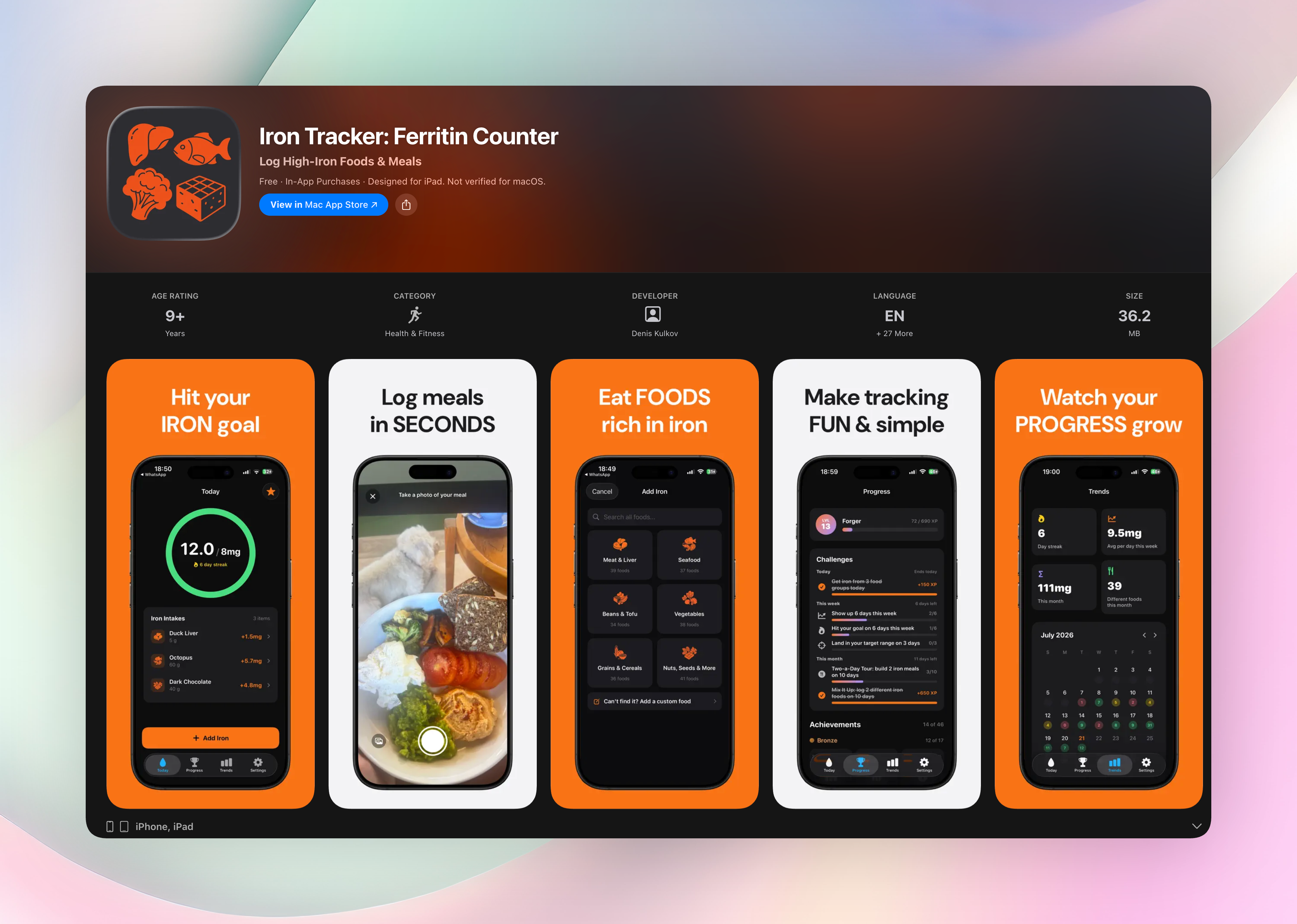
Most meal diaries ignore micronutrients like iron. Iron Tracker is the only app designed top-to-bottom to fix low iron, whether you’re dealing with anemia, following a vegetarian diet, or preparing for pregnancy. It strips away calorie clutter and puts one number front and center: your daily iron total.
A clean progress ring shows exactly how close you are to an NIH-based goal tailored to your age, sex, and pregnancy status. You can log iron-rich foods from a curated database of 225 items, or snap a photo, scan a barcode, or even speak your meal with AI assistance, then review the result before saving. The app breaks down heme and non-heme iron so you know what your body absorbs best.
- Set a personalized daily iron target from NIH guidelines based on gender, age, and pregnancy status
- Log quickly using photo, barcode, or voice with AI, and review every entry before saving
- See heme vs non-heme iron to understand absorption differences
- Track ferritin lab results alongside diet to connect eating patterns to iron stores
- Earn XP, level up, and unlock 46 achievements while keeping a streak on the weekly calendar
- Everything stays private: no account, no data collection, no ads
Download Get Iron Tracker or install directly from the Iron Tracker on the App Store.
2. MyFitnessPal
Best for: Someone who wants the largest food database and barcode scanner for all-around calorie and macro tracking.
MyFitnessPal has a massive food library and barcode scanner, so logging is fast. It tracks calories, carbs, protein, and fat, and syncs with fitness trackers for exercise. That depth is great if you want a full diet companion. But it can feel like overkill if all you need is a simple meal diary. Iron and ferritin don’t get any special attention, so it remains a broad tool rather than a targeted iron tracker.
3. Lose It!
Best for: Weight loss with clear calorie goals and motivational community features.
Lose It! makes meal tracking feel like a straightforward numbers game: set a daily calorie budget, scan barcodes, and watch progress bars fill up. Social challenges and streaks keep you motivated. The food database handles calories and macros well, but micronutrients like iron aren’t part of the picture. It’s a solid weight-loss companion, not a specialized iron diary.
4. Cronometer
Best for: Users who want the most detailed micronutrient data available in a mobile app.
Cronometer tracks up to 82 vitamins and minerals, making it popular for keto, vegan, or medically restrictive diets. You can see exact iron numbers, but the interface is dense, with charts, percentages, and tables everywhere. It’s the most data-heavy meal diary on this list. But it can feel clinical if you just want to rebuild iron without all that information.
5. Ate Food Diary
Best for: Building a mindful eating practice through photos, not numbers.
Ate ditches calories entirely. You snap a picture of your meal, then tag how you felt and why you ate. There’s no nutrient counting, so it won’t track iron, but it helps you notice patterns like stress snacking or skipping breakfast. It’s a gentle, visual meal diary that strengthens your relationship with food, ideal if numbers make you anxious.
6. See How You Eat Food Diary
Best for: Getting a quick, balanced-at-a-glance picture of your day.
This app arranges your meal photos into a clean grid, turning your day into a visual food collage. There’s no calorie or macro tracking; coaches often use it to spot gaps in fruits, veggies, or protein. It’s a low-stress way to keep a meal diary, though it won’t count iron or other specific nutrients.
7. Lifesum
Best for: Holistic healthy eating with tailored diet plans and recipes.
Lifesum blends meal logging with personalized plans (like Mediterranean or high-protein), macro targets, and a recipe library. It guides you toward general wellness, not a single nutrient. While you can see some vitamin info, it isn’t built to track iron intake or ferritin lab results. Think of it as a broader lifestyle coach.
8. YAZIO
Best for: Calorie counting plus intermittent fasting in one app.
YAZIO combines calorie and macro tracking with a fasting timer, plus meal plans for weight loss or muscle gain. The fasting timer is the main extra. As a meal diary, it handles the basics, but iron and other micronutrients aren’t the focus. It works for general goals, not targeted iron management.
9. Bitesnap
Best for: Fast, effortless logging with AI-powered image recognition.
Snap a photo and Bitesnap identifies the food and estimates calories and macros automatically. It’s the speediest way to keep a meal diary with minimal tapping. But the AI estimates are approximations, and detailed micronutrient tracking like iron isn’t its strong suit. Use it for awareness, not precise iron counts.
How we picked these apps
We looked for meal diaries that cover the spectrum, from zero-numbers photo logs to full micronutrient breakdowns. You’ll find barcode scanners, AI recognition, manual entry, and fasting timers in this roundup. We tested each for how quickly you can log a meal, how honest the mobile app reviews are, and whether the marketing matches reality. The one exception in platform coverage is Iron Tracker, which is iOS-only because it’s a focused tool, not a generic tracker. It stands out because most food apps ignore iron entirely. A ferritin-linked diary changes the approach for anyone with low iron.
Frequently asked questions
What is a meal diary?
A meal diary is a simple log of what you eat and drink throughout the day. It can be as basic as a notebook or as detailed as a mobile app that tracks calories and nutrients.
Do I need to count calories?
Not always. Many meal diaries, especially photo-based ones, let you skip numbers and focus on eating patterns. If weight loss is the goal, calorie counting helps. But for iron management, you can log just iron-rich foods.
Can a meal diary help with low iron?
A general meal diary won’t flag iron unless you dig into micronutrient data. Iron Tracker is built specifically to connect daily iron intake to ferritin levels, so it directly supports rebuilding iron stores.
The verdict
Iron Tracker is the top pick for anyone actively managing iron intake and ferritin levels. It’s the simplest way to rebuild iron without the clutter of full diet apps. For broader goals, other options on this list work well, but none tie your plate to your lab numbers the way Iron Tracker does. Download Get Iron Tracker and give your iron the attention it needs. This is the tool that finally fits.